> For the complete documentation index, see [llms.txt](https://bluebricks.co/docs/llms.txt). Markdown versions of documentation pages are available by appending `.md` to page URLs; this page is available as [Markdown](https://bluebricks.co/docs/integrations/githubactions.md).
# Github Actions
Run Bricks CLI commands in GitHub Actions workflows to automate blueprint publishing, deployment, and CI/CD pipelines
The Bluebricks GitHub Actions integration lets you run any Bricks CLI command directly from your GitHub workflows. Using the official **`bluebricks-co/bricks-action`** GitHub Action, you can:
* Bump and publish artifact and blueprint versions
* Detect and respond to changes in your IaC
* Deploy infrastructure to Bluebricks collections
* Automate approvals, promotions, and notifications as part of CI/CD
This keeps Bluebricks as the orchestration layer for your infrastructure, while GitHub remains the system of record for code and pipelines.
[Official Bricks CLI Action](https://github.com/marketplace/actions/bricks-cli-action)
***
### Core Capabilities
The Bricks GitHub Action provides:
* **Full Bricks CLI coverage**: run any supported Bricks CLI command (`updateci`, `install`, `bprint`, etc.)
* **Automatic version management**: detect changes and bump artifact/blueprint versions (patch, minor, major, or auto)
* **Blueprint publishing**: update and publish blueprints directly from workflow runs
* **Deployment integration**: trigger Bluebricks deployments as part of your pipeline
* **Git operations**: commit, push, and create PRs for version changes
* **Dry-run support**: simulate changes (e.g., on PRs) without publishing or deploying
***
### How to create a workflow with Bricks CLI Github Action
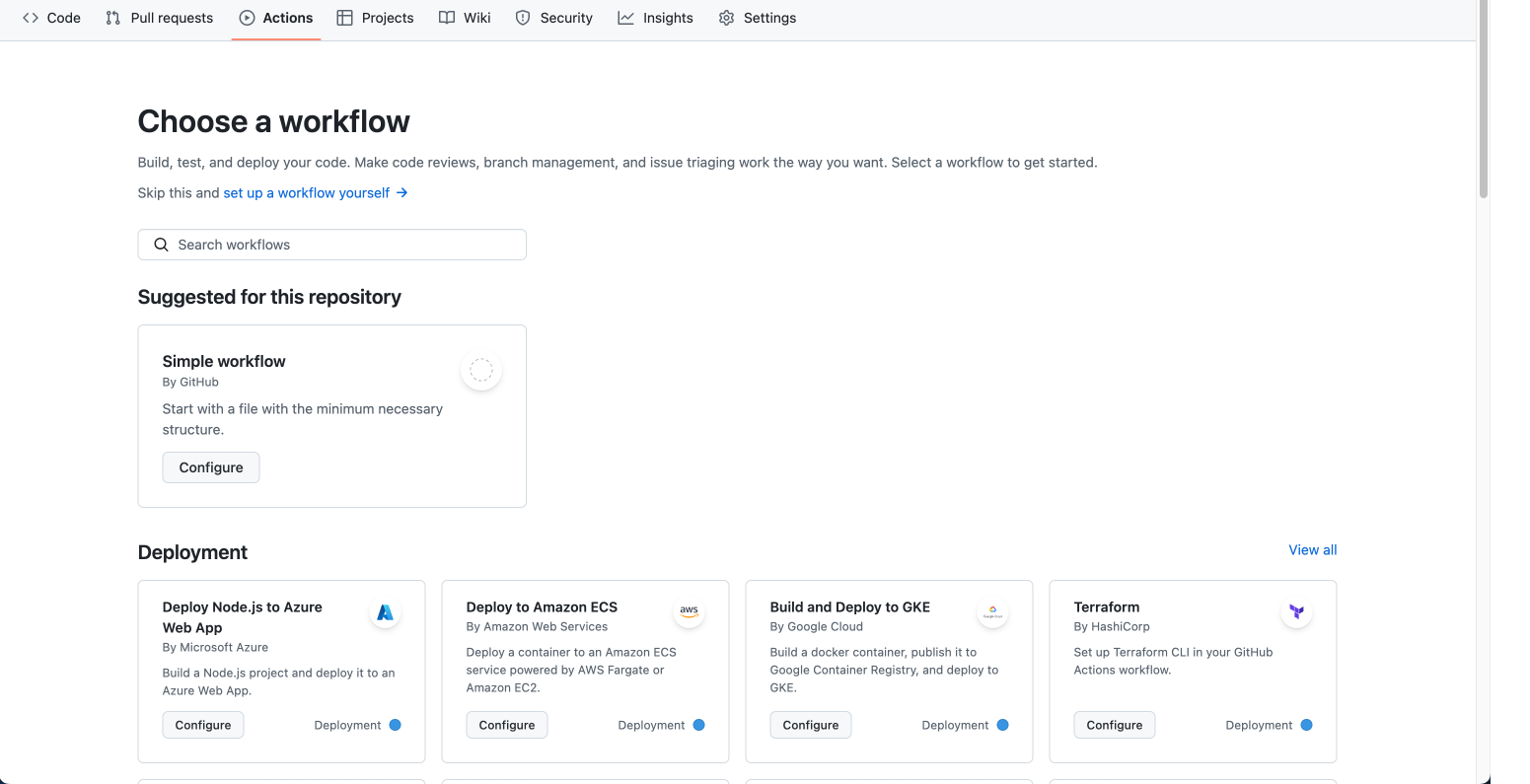
1. Create a new workflow and choose to set up a workflow yourself
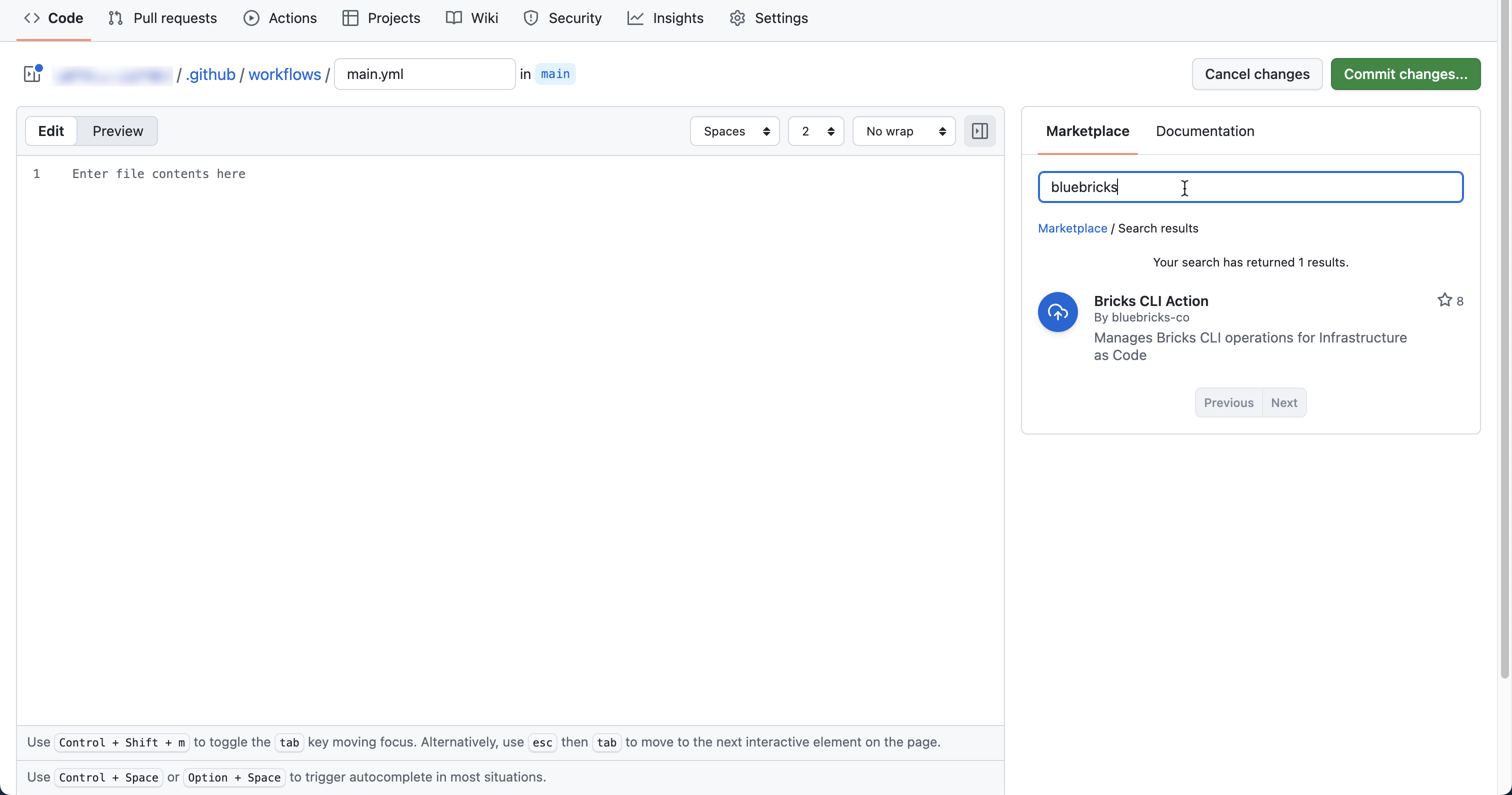
 2. Search for Bluebricks
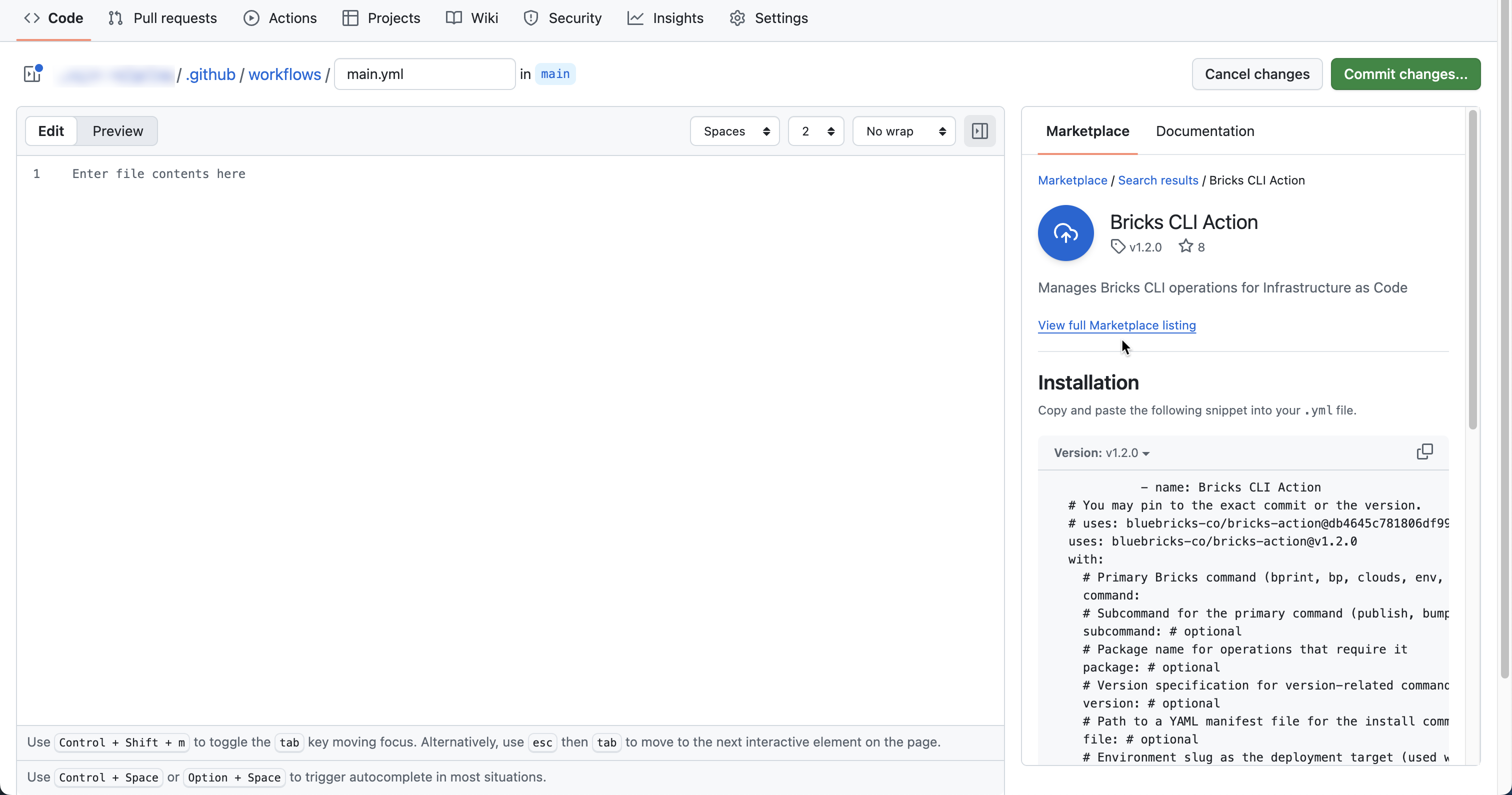
 3. Choose Bricks CLI Action to access the listing
 4. Create your workflow and commit changes
***
### Basic Usage
Add the Bricks Action to your workflow:
```yaml
jobs:
example:
runs-on: ubuntu-latest
steps:
- name: Checkout code
uses: actions/checkout@v4
- name: Run Bricks CLI
uses: bluebricks-co/bricks-action@v1.2.0
with:
command: 'install'
file: './deployments/main.yaml'
env: 'staging'
api-key: ${{ secrets.BRICKS_API_KEY }}
env:
GITHUB_TOKEN: ${{ secrets.GITHUB_TOKEN }}
```
The `command` input determines which Bricks CLI command runs (e.g., `updateci`, `install`).
***
#### Example: Update Artifacts and Blueprints on PR
Use `updateci` to detect changes and bump versions when a pull request is opened or approved:
```yaml
name: Update Artifacts and Blueprints on PR
on:
pull_request:
types: [opened, synchronize, reopened]
pull_request_review:
types: [submitted]
permissions:
id-token: write
contents: write
pull-requests: write
jobs:
updateci:
runs-on: ubuntu-latest
if: |
(github.event_name == 'pull_request') ||
(github.event_name == 'pull_request_review' && github.event.review.state == 'approved')
steps:
- name: Checkout code
uses: actions/checkout@v4
with:
fetch-depth: 0
persist-credentials: false
ref: ${{ github.event.pull_request.head.ref }}
- name: Run updateci Command
uses: bluebricks-co/bricks-action@v1.2.0
with:
command: 'updateci'
artifacts-folder: 'bluebricks/packages'
blueprints-folder: 'bluebricks/blueprints'
artifact-bump: 'patch'
blueprint-bump: 'patch'
base: '${{ github.base_ref }}'
api-key: ${{ secrets.BRICKS_API_KEY }}
flags: ${{ github.event_name == 'pull_request' && '--dry' || '' }}
env:
GITHUB_TOKEN: ${{ secrets.GITHUB_TOKEN }}
```
This pattern is ideal for **automatic versioning + review**, using dry-run mode on PRs.
***
#### Example: Deploy Infrastructure with Install
Use the `install` command to generate plans and apply deployments from GitHub Actions:
```yaml
name: Deploy Infrastructure
on:
pull_request:
paths:
- 'deployments/**'
workflow_dispatch:
inputs:
collection:
description: 'Target collection'
required: true
default: 'staging'
jobs:
deploy:
runs-on: ubuntu-latest
steps:
- name: Checkout code
uses: actions/checkout@v4
- name: Deploy with Bricks
uses: bluebricks-co/bricks-action@v1.2.0
with:
command: 'install'
file: './deployments/main.yaml'
env: ${{ github.event_name == 'workflow_dispatch' && github.event.inputs.collection || 'staging' }}
plan-only: ${{ github.event_name == 'pull_request' }}
api-key: ${{ secrets.BRICKS_API_KEY }}
env:
GITHUB_TOKEN: ${{ secrets.GITHUB_TOKEN }}
```
Common pattern:
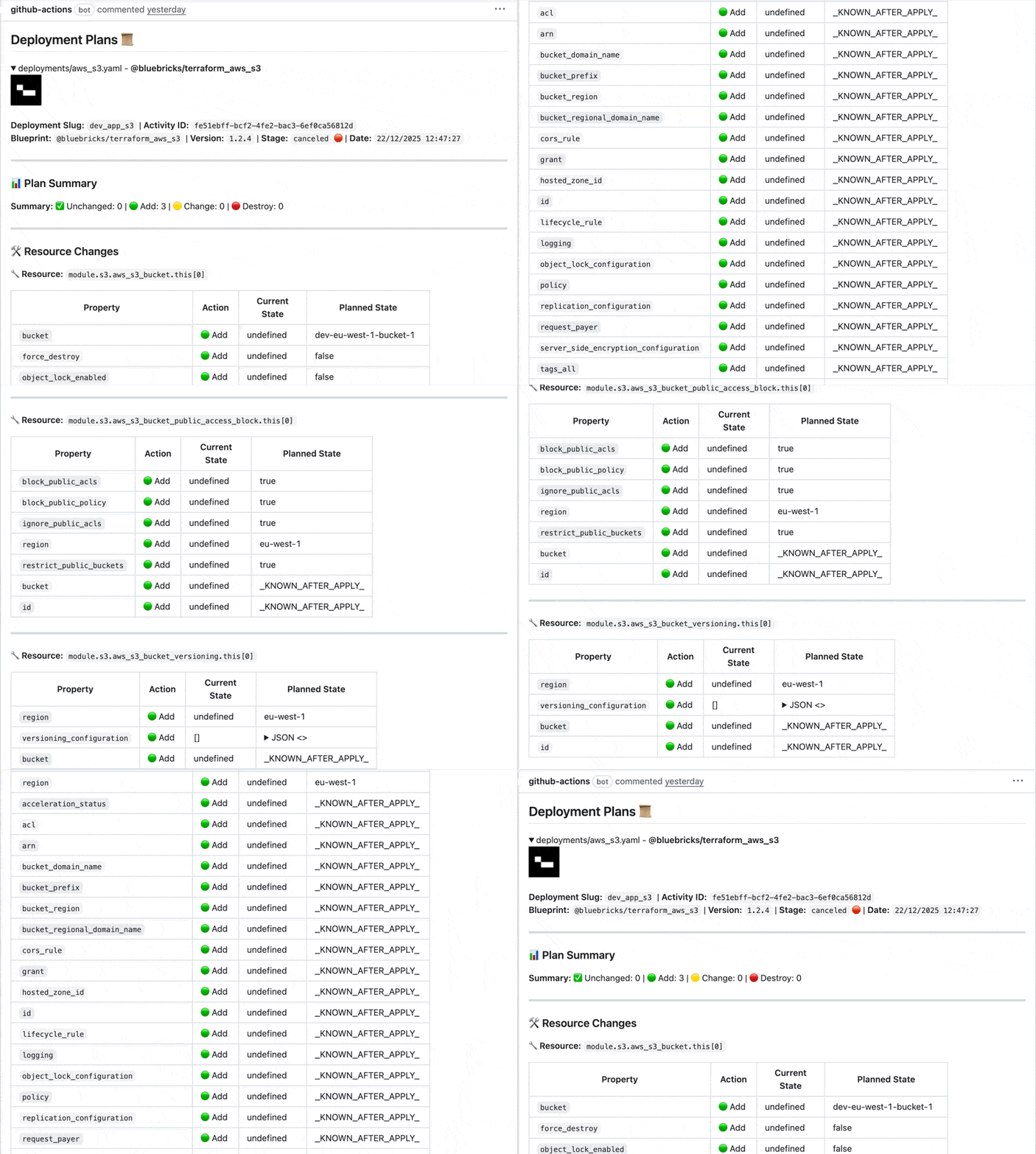
* **PRs** → `plan-only: true` for review\
This will create an MD file of the plan and display it once a PR is submitted
4. Create your workflow and commit changes
***
### Basic Usage
Add the Bricks Action to your workflow:
```yaml
jobs:
example:
runs-on: ubuntu-latest
steps:
- name: Checkout code
uses: actions/checkout@v4
- name: Run Bricks CLI
uses: bluebricks-co/bricks-action@v1.2.0
with:
command: 'install'
file: './deployments/main.yaml'
env: 'staging'
api-key: ${{ secrets.BRICKS_API_KEY }}
env:
GITHUB_TOKEN: ${{ secrets.GITHUB_TOKEN }}
```
The `command` input determines which Bricks CLI command runs (e.g., `updateci`, `install`).
***
#### Example: Update Artifacts and Blueprints on PR
Use `updateci` to detect changes and bump versions when a pull request is opened or approved:
```yaml
name: Update Artifacts and Blueprints on PR
on:
pull_request:
types: [opened, synchronize, reopened]
pull_request_review:
types: [submitted]
permissions:
id-token: write
contents: write
pull-requests: write
jobs:
updateci:
runs-on: ubuntu-latest
if: |
(github.event_name == 'pull_request') ||
(github.event_name == 'pull_request_review' && github.event.review.state == 'approved')
steps:
- name: Checkout code
uses: actions/checkout@v4
with:
fetch-depth: 0
persist-credentials: false
ref: ${{ github.event.pull_request.head.ref }}
- name: Run updateci Command
uses: bluebricks-co/bricks-action@v1.2.0
with:
command: 'updateci'
artifacts-folder: 'bluebricks/packages'
blueprints-folder: 'bluebricks/blueprints'
artifact-bump: 'patch'
blueprint-bump: 'patch'
base: '${{ github.base_ref }}'
api-key: ${{ secrets.BRICKS_API_KEY }}
flags: ${{ github.event_name == 'pull_request' && '--dry' || '' }}
env:
GITHUB_TOKEN: ${{ secrets.GITHUB_TOKEN }}
```
This pattern is ideal for **automatic versioning + review**, using dry-run mode on PRs.
***
#### Example: Deploy Infrastructure with Install
Use the `install` command to generate plans and apply deployments from GitHub Actions:
```yaml
name: Deploy Infrastructure
on:
pull_request:
paths:
- 'deployments/**'
workflow_dispatch:
inputs:
collection:
description: 'Target collection'
required: true
default: 'staging'
jobs:
deploy:
runs-on: ubuntu-latest
steps:
- name: Checkout code
uses: actions/checkout@v4
- name: Deploy with Bricks
uses: bluebricks-co/bricks-action@v1.2.0
with:
command: 'install'
file: './deployments/main.yaml'
env: ${{ github.event_name == 'workflow_dispatch' && github.event.inputs.collection || 'staging' }}
plan-only: ${{ github.event_name == 'pull_request' }}
api-key: ${{ secrets.BRICKS_API_KEY }}
env:
GITHUB_TOKEN: ${{ secrets.GITHUB_TOKEN }}
```
Common pattern:
* **PRs** → `plan-only: true` for review\
This will create an MD file of the plan and display it once a PR is submitted
 * **Manual or branch pushes** → full apply to a target collection
***
#### Publishing Blueprints with GitHub Actions
A typical blueprint publishing workflow triggers on changes to the `bluebricks/**` folder:
```yaml
name: Publish Blueprint
on:
push:
branches: [main]
paths:
- 'bluebricks/**'
permissions:
id-token: write
contents: write
jobs:
publish:
runs-on: ubuntu-latest
steps:
- name: Checkout code
uses: actions/checkout@v4
with:
fetch-depth: 0
- name: Publish Blueprint
uses: bluebricks-co/bricks-action@v1.2.0
with:
command: 'updateci'
artifacts-folder: 'bluebricks/packages'
blueprints-folder: 'bluebricks/blueprints'
artifact-bump: 'patch'
blueprint-bump: 'patch'
api-key: ${{ secrets.BRICKS_API_KEY }}
env:
GITHUB_TOKEN: ${{ secrets.GITHUB_TOKEN }}
```
This automatically:
* Detects changes
* Bumps versions
* Updates dependencies
* Commits and pushes version changes back to the repo
***
### Inputs (High-Level)
#### Global
* **`command`**: (Required) Bricks CLI command to run (e.g., `updateci`, `install`, `bprint`).
#### Common for `updateci`
* **`artifacts-folder`**: Path to artifacts source (e.g., `bluebricks/packages`).
* **`blueprints-folder`**: Path to blueprints (e.g., `bluebricks/blueprints`).
* **`artifact-bump` / `blueprint-bump`**: Version bump type (`patch`, `minor`, `major`, `auto`).
* **`output`**: Dependency graph format (`ascii` or `json`).
* **`api-key`**: Bluebricks API key (from secrets).
* **`flags`**: Extra CLI flags (e.g., `--dry`, `--verbose`).
#### Common for `install`
* **`file`**: Path to deployment manifest YAML.
* **`env`**: Collection slug.
* **`plan-only`**: Whether to plan without applying.
* **`set-slug`**: Custom deployment slug (optional).
* **`api-key`**: Bluebricks API key.
***
### Outputs
For the `updateci` command, the following outputs are available:
* **`has_changes`** : Whether any versions were updated.
* **`changes_summary`** : Summary of version and dependency changes.
* **`dependency_graph`** : ASCII or JSON dependency graph.
For the `install` command, the following outputs are available:
* **`deployment_plan`** : Detailed deployment plan with resources to change.
* **`plan_id`** : Unique identifier for the generated plan.
you can consume outputs in later steps, for example:
Example:
```yaml
- name: Publish Blueprint
id: publish
uses: bluebricks-co/bricks-action@v1.2.0
with:
command: 'updateci'
# ...
- name: Process Results
run: |
echo "Has changes: ${{ steps.publish.outputs.has_changes }}"
echo "Changes summary: ${{ steps.publish.outputs.changes_summary }}"
echo "Dependency graph: ${{ steps.publish.outputs.dependency_graph }}"
```
***
### Prerequisites & Secrets
* **BRICKS\_API\_KEY**
* A valid Bluebricks API key stored as a GitHub Actions secret (e.g., `BRICKS_API_KEY`).
* **GITHUB\_TOKEN**
* The built-in `GITHUB_TOKEN` is used for commits, pushes, and PR interaction.
* **Organization Secrets**
For multiple repositories, use organization secrets:
1. Go to your GitHub organization
2. Navigate to Settings > Secrets and variables > Actions
3. Add organization-level secrets
4. Configure repository access
* **Permissions**\
If you specify workflow permissions you must add these:\
`contents: write`\
`pull-requests: write`
* **Repository structure**
* Recommended folders:
* `bluebricks/packages`: artifact source
* `bluebricks/blueprints`: blueprint definitions
* `deployments/`: deployment manifest files
```
my_blueprint-repo/
├── .github/
│ └── workflows/
│ ├── publish.yml
│ ├── deploy-staging.yml
│ └── deploy-production.yml
├── bluebricks/
│ ├── packages/ # Artifact source code
│ │ ├── terraform/
│ │ ├── helm/
│ │ └── cloudformation/
│ └── blueprints/ # Blueprint configurations
│ ├── staging/
│ └── production/
├── deployments/ # Deployment manifests
│ ├── staging.yaml
│ └── production.yaml
└── README.md
```
For multi-repo setups, consider using **Organization Secrets** to share the same `BRICKS_API_KEY` across repositories.
***
### Advanced Patterns
You can combine the Bricks Action with standard GitHub Actions features to build richer workflows:
* **Multi-collection pipelines**: Decide collection based on branch (`main → production`, `develop → staging`).
* **Matrix publishing**: Publish to multiple collections or strategies in parallel.
* **Scheduled publishing**: Use `schedule:` to publish on a weekly or nightly cadence.
* **Approval gates**: Use GitHub Collections with required approvals for production publishing.
* **Notifications**: Add Slack or email steps that consume `has_changes` or job status to notify teams on success/failure.
#### Example: Multi-Collection Publishing
```yaml
name: Multi-Collection Blueprint Publishing
on:
push:
branches: [main, develop, staging]
pull_request:
types: [opened, synchronize, reopened]
workflow_dispatch:
inputs:
collection:
description: 'Target collection'
required: true
default: 'staging'
type: choice
options:
- staging
- production
permissions:
id-token: write
contents: write
pull-requests: write
jobs:
detect-changes:
runs-on: ubuntu-latest
outputs:
has-artifacts: ${{ steps.changes.outputs.artifacts }}
has-blueprints: ${{ steps.changes.outputs.blueprints }}
collection: ${{ steps.env.outputs.collection }}
steps:
- name: Checkout code
uses: actions/checkout@v4
with:
fetch-depth: 0
- name: Detect changes
uses: dorny/paths-filter@v2
id: changes
with:
filters: |
artifacts:
- 'bluebricks/packages/**'
blueprints:
- 'bluebricks/blueprints/**'
- name: Determine collection
id: env
run: |
if [ "${{ github.event_name }}" = "workflow_dispatch" ]; then
echo "collection=${{ github.event.inputs.collection }}" >> $GITHUB_OUTPUT
elif [ "${{ github.ref }}" = "refs/heads/main" ]; then
echo "collection=production" >> $GITHUB_OUTPUT
elif [ "${{ github.ref }}" = "refs/heads/develop" ]; then
echo "collection=staging" >> $GITHUB_OUTPUT
else
echo "collection=development" >> $GITHUB_OUTPUT
fi
publish:
runs-on: ubuntu-latest
needs: detect-changes
if: needs.detect-changes.outputs.has-artifacts == 'true' || needs.detect-changes.outputs.has-blueprints == 'true'
steps:
- name: Checkout code
uses: actions/checkout@v4
with:
fetch-depth: 0
persist-credentials: false
ref: ${{ github.event.pull_request.head.ref || github.ref }}
- name: Update and Publish
uses: bluebricks-co/bricks-action@v1.2.0
with:
command: 'updateci'
artifacts-folder: 'bluebricks/packages'
blueprints-folder: 'bluebricks/blueprints'
artifact-bump: 'patch'
blueprint-bump: 'patch'
base: '${{ github.base_ref }}'
api-key: ${{ secrets.BRICKS_API_KEY }}
flags: ${{ github.event_name == 'pull_request' && '--dry' || '' }}
env:
GITHUB_TOKEN: ${{ secrets.GITHUB_TOKEN }}
- name: Deploy to Collection
if: github.event_name == 'push' && needs.detect-changes.outputs.collection != 'development'
uses: bluebricks-co/bricks-action@v1.2.0
with:
command: 'install'
file: './deployments/main.yaml'
env: ${{ needs.detect-changes.outputs.collection }}
plan-only: false
api-key: ${{ secrets.BRICKS_API_KEY }}
env:
GITHUB_TOKEN: ${{ secrets.GITHUB_TOKEN }}
```
#### Example: Conditional Publishing with Matrix
```yaml
name: Matrix Blueprint Publishing
on:
push:
branches: [main]
paths:
- 'bluebricks/**'
permissions:
id-token: write
contents: write
jobs:
publish:
runs-on: ubuntu-latest
strategy:
matrix:
include:
- collection: staging
bump-type: patch
- collection: production
bump-type: minor
steps:
- name: Checkout code
uses: actions/checkout@v4
with:
fetch-depth: 0
- name: Publish Blueprint
uses: bluebricks-co/bricks-action@v1.2.0
with:
command: 'updateci'
artifacts-folder: 'bluebricks/packages'
blueprints-folder: 'bluebricks/blueprints'
artifact-bump: ${{ matrix.bump-type }}
blueprint-bump: ${{ matrix.bump-type }}
api-key: ${{ secrets.BRICKS_API_KEY }}
env:
GITHUB_TOKEN: ${{ secrets.GITHUB_TOKEN }}
- name: Deploy to ${{ matrix.collection }}
uses: bluebricks-co/bricks-action@v1.2.0
with:
command: 'install'
file: './deployments/${{ matrix.collection }}.yaml'
env: ${{ matrix.collection }}
plan-only: false
api-key: ${{ secrets.BRICKS_API_KEY }}
env:
GITHUB_TOKEN: ${{ secrets.GITHUB_TOKEN }}
```
***
### Customization & Precedence
Bricks CLI configuration follows this precedence:
1. GitHub Action inputs
2. Collection variables
3. Bricks config file (e.g., `config.yaml`)
4. Internal defaults
This gives you flexibility to:
* Keep most configuration in code
* Override behavior per workflow or job with inputs and flags
* Reuse a shared configuration file where it makes sense
#### Example: Scheduled Publishing
```yaml
name: Scheduled Blueprint Publishing
on:
schedule:
- cron: '0 2 * * 1' # Every Monday at 2 AM
workflow_dispatch:
permissions:
id-token: write
contents: write
jobs:
publish:
runs-on: ubuntu-latest
steps:
- name: Checkout code
uses: actions/checkout@v4
with:
fetch-depth: 0
- name: Publish Blueprint
uses: bluebricks-co/bricks-action@v1.2.0
with:
command: 'updateci'
artifacts-folder: 'bluebricks/packages'
blueprints-folder: 'bluebricks/blueprints'
artifact-bump: 'patch'
blueprint-bump: 'patch'
api-key: ${{ secrets.BRICKS_API_KEY }}
env:
GITHUB_TOKEN: ${{ secrets.GITHUB_TOKEN }}
```
#### Example: Approval Gates
Use [GitHub Environments](https://docs.github.com/en/actions/deployment/targeting-different-environments/using-environments-for-deployment) with required reviewers to gate production publishing:
```yaml
name: Blueprint Publishing with Approval
on:
push:
branches: [main]
permissions:
id-token: write
contents: write
jobs:
publish:
runs-on: ubuntu-latest
environment: production # Requires approval from designated reviewers
steps:
- name: Checkout code
uses: actions/checkout@v4
with:
fetch-depth: 0
- name: Publish Blueprint
uses: bluebricks-co/bricks-action@v1.2.0
with:
command: 'updateci'
artifacts-folder: 'bluebricks/packages'
blueprints-folder: 'bluebricks/blueprints'
artifact-bump: 'minor'
blueprint-bump: 'minor'
api-key: ${{ secrets.BRICKS_API_KEY }}
env:
GITHUB_TOKEN: ${{ secrets.GITHUB_TOKEN }}
```
#### Example: Slack Notifications
Add a notification step to report publishing results to your team:
```yaml
- name: Notify Slack
if: always()
uses: 8398a7/action-slack@v3
with:
status: ${{ job.status }}
channel: '#deployments'
webhook_url: ${{ secrets.SLACK_WEBHOOK }}
fields: repo,message,commit,author,action,eventName,ref,workflow
```
***
### Best Practices
#### Workflow Design
* Use path filters to trigger only on relevant changes
* Implement proper error handling and rollback procedures
* Use collection-specific configurations
* Add status checks for pull requests
#### Security
* Store API keys in GitHub Secrets
* Use least-privilege permissions
* Review workflow changes carefully
* Monitor workflow execution logs
#### Performance
* Use matrix strategies for parallel execution
* Cache dependencies when possible
* Optimize workflow triggers
* Monitor workflow execution time
* **Manual or branch pushes** → full apply to a target collection
***
#### Publishing Blueprints with GitHub Actions
A typical blueprint publishing workflow triggers on changes to the `bluebricks/**` folder:
```yaml
name: Publish Blueprint
on:
push:
branches: [main]
paths:
- 'bluebricks/**'
permissions:
id-token: write
contents: write
jobs:
publish:
runs-on: ubuntu-latest
steps:
- name: Checkout code
uses: actions/checkout@v4
with:
fetch-depth: 0
- name: Publish Blueprint
uses: bluebricks-co/bricks-action@v1.2.0
with:
command: 'updateci'
artifacts-folder: 'bluebricks/packages'
blueprints-folder: 'bluebricks/blueprints'
artifact-bump: 'patch'
blueprint-bump: 'patch'
api-key: ${{ secrets.BRICKS_API_KEY }}
env:
GITHUB_TOKEN: ${{ secrets.GITHUB_TOKEN }}
```
This automatically:
* Detects changes
* Bumps versions
* Updates dependencies
* Commits and pushes version changes back to the repo
***
### Inputs (High-Level)
#### Global
* **`command`**: (Required) Bricks CLI command to run (e.g., `updateci`, `install`, `bprint`).
#### Common for `updateci`
* **`artifacts-folder`**: Path to artifacts source (e.g., `bluebricks/packages`).
* **`blueprints-folder`**: Path to blueprints (e.g., `bluebricks/blueprints`).
* **`artifact-bump` / `blueprint-bump`**: Version bump type (`patch`, `minor`, `major`, `auto`).
* **`output`**: Dependency graph format (`ascii` or `json`).
* **`api-key`**: Bluebricks API key (from secrets).
* **`flags`**: Extra CLI flags (e.g., `--dry`, `--verbose`).
#### Common for `install`
* **`file`**: Path to deployment manifest YAML.
* **`env`**: Collection slug.
* **`plan-only`**: Whether to plan without applying.
* **`set-slug`**: Custom deployment slug (optional).
* **`api-key`**: Bluebricks API key.
***
### Outputs
For the `updateci` command, the following outputs are available:
* **`has_changes`** : Whether any versions were updated.
* **`changes_summary`** : Summary of version and dependency changes.
* **`dependency_graph`** : ASCII or JSON dependency graph.
For the `install` command, the following outputs are available:
* **`deployment_plan`** : Detailed deployment plan with resources to change.
* **`plan_id`** : Unique identifier for the generated plan.
you can consume outputs in later steps, for example:
Example:
```yaml
- name: Publish Blueprint
id: publish
uses: bluebricks-co/bricks-action@v1.2.0
with:
command: 'updateci'
# ...
- name: Process Results
run: |
echo "Has changes: ${{ steps.publish.outputs.has_changes }}"
echo "Changes summary: ${{ steps.publish.outputs.changes_summary }}"
echo "Dependency graph: ${{ steps.publish.outputs.dependency_graph }}"
```
***
### Prerequisites & Secrets
* **BRICKS\_API\_KEY**
* A valid Bluebricks API key stored as a GitHub Actions secret (e.g., `BRICKS_API_KEY`).
* **GITHUB\_TOKEN**
* The built-in `GITHUB_TOKEN` is used for commits, pushes, and PR interaction.
* **Organization Secrets**
For multiple repositories, use organization secrets:
1. Go to your GitHub organization
2. Navigate to Settings > Secrets and variables > Actions
3. Add organization-level secrets
4. Configure repository access
* **Permissions**\
If you specify workflow permissions you must add these:\
`contents: write`\
`pull-requests: write`
* **Repository structure**
* Recommended folders:
* `bluebricks/packages`: artifact source
* `bluebricks/blueprints`: blueprint definitions
* `deployments/`: deployment manifest files
```
my_blueprint-repo/
├── .github/
│ └── workflows/
│ ├── publish.yml
│ ├── deploy-staging.yml
│ └── deploy-production.yml
├── bluebricks/
│ ├── packages/ # Artifact source code
│ │ ├── terraform/
│ │ ├── helm/
│ │ └── cloudformation/
│ └── blueprints/ # Blueprint configurations
│ ├── staging/
│ └── production/
├── deployments/ # Deployment manifests
│ ├── staging.yaml
│ └── production.yaml
└── README.md
```
For multi-repo setups, consider using **Organization Secrets** to share the same `BRICKS_API_KEY` across repositories.
***
### Advanced Patterns
You can combine the Bricks Action with standard GitHub Actions features to build richer workflows:
* **Multi-collection pipelines**: Decide collection based on branch (`main → production`, `develop → staging`).
* **Matrix publishing**: Publish to multiple collections or strategies in parallel.
* **Scheduled publishing**: Use `schedule:` to publish on a weekly or nightly cadence.
* **Approval gates**: Use GitHub Collections with required approvals for production publishing.
* **Notifications**: Add Slack or email steps that consume `has_changes` or job status to notify teams on success/failure.
#### Example: Multi-Collection Publishing
```yaml
name: Multi-Collection Blueprint Publishing
on:
push:
branches: [main, develop, staging]
pull_request:
types: [opened, synchronize, reopened]
workflow_dispatch:
inputs:
collection:
description: 'Target collection'
required: true
default: 'staging'
type: choice
options:
- staging
- production
permissions:
id-token: write
contents: write
pull-requests: write
jobs:
detect-changes:
runs-on: ubuntu-latest
outputs:
has-artifacts: ${{ steps.changes.outputs.artifacts }}
has-blueprints: ${{ steps.changes.outputs.blueprints }}
collection: ${{ steps.env.outputs.collection }}
steps:
- name: Checkout code
uses: actions/checkout@v4
with:
fetch-depth: 0
- name: Detect changes
uses: dorny/paths-filter@v2
id: changes
with:
filters: |
artifacts:
- 'bluebricks/packages/**'
blueprints:
- 'bluebricks/blueprints/**'
- name: Determine collection
id: env
run: |
if [ "${{ github.event_name }}" = "workflow_dispatch" ]; then
echo "collection=${{ github.event.inputs.collection }}" >> $GITHUB_OUTPUT
elif [ "${{ github.ref }}" = "refs/heads/main" ]; then
echo "collection=production" >> $GITHUB_OUTPUT
elif [ "${{ github.ref }}" = "refs/heads/develop" ]; then
echo "collection=staging" >> $GITHUB_OUTPUT
else
echo "collection=development" >> $GITHUB_OUTPUT
fi
publish:
runs-on: ubuntu-latest
needs: detect-changes
if: needs.detect-changes.outputs.has-artifacts == 'true' || needs.detect-changes.outputs.has-blueprints == 'true'
steps:
- name: Checkout code
uses: actions/checkout@v4
with:
fetch-depth: 0
persist-credentials: false
ref: ${{ github.event.pull_request.head.ref || github.ref }}
- name: Update and Publish
uses: bluebricks-co/bricks-action@v1.2.0
with:
command: 'updateci'
artifacts-folder: 'bluebricks/packages'
blueprints-folder: 'bluebricks/blueprints'
artifact-bump: 'patch'
blueprint-bump: 'patch'
base: '${{ github.base_ref }}'
api-key: ${{ secrets.BRICKS_API_KEY }}
flags: ${{ github.event_name == 'pull_request' && '--dry' || '' }}
env:
GITHUB_TOKEN: ${{ secrets.GITHUB_TOKEN }}
- name: Deploy to Collection
if: github.event_name == 'push' && needs.detect-changes.outputs.collection != 'development'
uses: bluebricks-co/bricks-action@v1.2.0
with:
command: 'install'
file: './deployments/main.yaml'
env: ${{ needs.detect-changes.outputs.collection }}
plan-only: false
api-key: ${{ secrets.BRICKS_API_KEY }}
env:
GITHUB_TOKEN: ${{ secrets.GITHUB_TOKEN }}
```
#### Example: Conditional Publishing with Matrix
```yaml
name: Matrix Blueprint Publishing
on:
push:
branches: [main]
paths:
- 'bluebricks/**'
permissions:
id-token: write
contents: write
jobs:
publish:
runs-on: ubuntu-latest
strategy:
matrix:
include:
- collection: staging
bump-type: patch
- collection: production
bump-type: minor
steps:
- name: Checkout code
uses: actions/checkout@v4
with:
fetch-depth: 0
- name: Publish Blueprint
uses: bluebricks-co/bricks-action@v1.2.0
with:
command: 'updateci'
artifacts-folder: 'bluebricks/packages'
blueprints-folder: 'bluebricks/blueprints'
artifact-bump: ${{ matrix.bump-type }}
blueprint-bump: ${{ matrix.bump-type }}
api-key: ${{ secrets.BRICKS_API_KEY }}
env:
GITHUB_TOKEN: ${{ secrets.GITHUB_TOKEN }}
- name: Deploy to ${{ matrix.collection }}
uses: bluebricks-co/bricks-action@v1.2.0
with:
command: 'install'
file: './deployments/${{ matrix.collection }}.yaml'
env: ${{ matrix.collection }}
plan-only: false
api-key: ${{ secrets.BRICKS_API_KEY }}
env:
GITHUB_TOKEN: ${{ secrets.GITHUB_TOKEN }}
```
***
### Customization & Precedence
Bricks CLI configuration follows this precedence:
1. GitHub Action inputs
2. Collection variables
3. Bricks config file (e.g., `config.yaml`)
4. Internal defaults
This gives you flexibility to:
* Keep most configuration in code
* Override behavior per workflow or job with inputs and flags
* Reuse a shared configuration file where it makes sense
#### Example: Scheduled Publishing
```yaml
name: Scheduled Blueprint Publishing
on:
schedule:
- cron: '0 2 * * 1' # Every Monday at 2 AM
workflow_dispatch:
permissions:
id-token: write
contents: write
jobs:
publish:
runs-on: ubuntu-latest
steps:
- name: Checkout code
uses: actions/checkout@v4
with:
fetch-depth: 0
- name: Publish Blueprint
uses: bluebricks-co/bricks-action@v1.2.0
with:
command: 'updateci'
artifacts-folder: 'bluebricks/packages'
blueprints-folder: 'bluebricks/blueprints'
artifact-bump: 'patch'
blueprint-bump: 'patch'
api-key: ${{ secrets.BRICKS_API_KEY }}
env:
GITHUB_TOKEN: ${{ secrets.GITHUB_TOKEN }}
```
#### Example: Approval Gates
Use [GitHub Environments](https://docs.github.com/en/actions/deployment/targeting-different-environments/using-environments-for-deployment) with required reviewers to gate production publishing:
```yaml
name: Blueprint Publishing with Approval
on:
push:
branches: [main]
permissions:
id-token: write
contents: write
jobs:
publish:
runs-on: ubuntu-latest
environment: production # Requires approval from designated reviewers
steps:
- name: Checkout code
uses: actions/checkout@v4
with:
fetch-depth: 0
- name: Publish Blueprint
uses: bluebricks-co/bricks-action@v1.2.0
with:
command: 'updateci'
artifacts-folder: 'bluebricks/packages'
blueprints-folder: 'bluebricks/blueprints'
artifact-bump: 'minor'
blueprint-bump: 'minor'
api-key: ${{ secrets.BRICKS_API_KEY }}
env:
GITHUB_TOKEN: ${{ secrets.GITHUB_TOKEN }}
```
#### Example: Slack Notifications
Add a notification step to report publishing results to your team:
```yaml
- name: Notify Slack
if: always()
uses: 8398a7/action-slack@v3
with:
status: ${{ job.status }}
channel: '#deployments'
webhook_url: ${{ secrets.SLACK_WEBHOOK }}
fields: repo,message,commit,author,action,eventName,ref,workflow
```
***
### Best Practices
#### Workflow Design
* Use path filters to trigger only on relevant changes
* Implement proper error handling and rollback procedures
* Use collection-specific configurations
* Add status checks for pull requests
#### Security
* Store API keys in GitHub Secrets
* Use least-privilege permissions
* Review workflow changes carefully
* Monitor workflow execution logs
#### Performance
* Use matrix strategies for parallel execution
* Cache dependencies when possible
* Optimize workflow triggers
* Monitor workflow execution time