Managing the Unmanaged: A Practical Guide to Codifying Your Cloud Infrastructure


A few years back, I was leading a cloud migration while also expanding into a second cloud provider. Two tracks running in parallel. The migration meant lifting workloads from legacy infra into a new account. The expansion meant standing up a fresh environment on a provider we hadn't used before.
The new provider was the easy part. Green field. You write the Terraform, you ship it, you move on. The migration was a different story. Hundreds of resources that had been created over years through the console. No code. No state files. No documentation beyond tribal knowledge spread across three teams.
If you've been in DevOps long enough, you've lived some version of this. Maybe it wasn't a migration. Maybe it was a startup that grew faster than its processes. Or a team that went "just this once" through the console until "just this once" became the default.
The result is always the same: you can't manage what you can't see, and you can't evolve what you didn't codify.
This post is the guide I wish I had back then. The real tools, the real commands, the real limitations of codifying existing cloud infrastructure. And what's structurally missing from all of them.

Why Unmanaged Resources Are a Ticking Time Bomb
Let's call it what it is - infrastructure dark matter. Resources that exist in your cloud account, consume budget, serve traffic, and have zero representation in code. Most enterprises I've worked with have 40-60% of their infrastructure in this state. It's not negligence. It's entropy.
Here's where things break down:
- Drift is invisible. Without a source of truth, you can't tell when a resource's config has changed. Was that security group rule always open to 0.0.0.0/0, or did someone add it at 2 AM during an incident?
- Compliance becomes a manual audit. Every SOC 2 or ISO cycle turns into a detective exercise. Auditors want to see controls. They want to see the code.
- Scaling is handcrafted. Need another environment? Without code, you're clicking through the console again, hoping you remember every setting. That's not scaling. That's craft brewing.
- Knowledge walks out the door. When the person who built it leaves, the understanding of why it was built that way leaves with them. Code is documentation that actually runs.
The longer these resources stay unmanaged, the harder they become to codify. Dependencies pile up. Configs drift from any reasonable default. The blast radius of "just importing it" grows every day.
The Codification Toolkit
Here's my assessment on every serious tool for codifying existing cloud resources into Terraform/OpenTofu.
Native terraform import / tofu import
Since Terraform 1.5, HashiCorp introduced import blocks - a declarative way to import resources that lives in your config, not just in a CLI command.
Run with config generation:
This writes a generated.tf file with the resource block filled in from live state. You can then review it, clean it up, and integrate it into your codebase.
What's good:
- First-class support, no third-party tools
- The import block is reviewable in PRs. You can see what is being imported before it happens
- Works with OpenTofu (tofu plan -generate-config-out=generated.tf)
My take:
- It's one resource at a time. Importing 200 resources means writing 200 import blocks
- The generated config is skeleton-quality. Expect default values, no local references, no variables
- Zero dependency awareness. A security group and the EC2 instance using it are treated as completely unrelated
- You still need to know the resource type and its import ID format. That varies wildly across providers
- Not all providers support it (i.e azure-rm is still beta and fragile)
For a handful of resources, this is the right tool. For an entire account, it's a starting point at best.
Terraformer
Terraformer was the first real attempt at bulk import. It connects to your cloud provider API and generates both Terraform config and state for all discovered resources.
The --compact flag merges resources into fewer files. --path-pattern gives you control over directory structure.
What's good:
- Bulk import across an entire account or specific resource types
- Supports AWS, GCP, Azure, and dozens of other providers
- Generates both .tf files and terraform.tfstate
My take:
- The output is monolithic. Everything lands in flat files with no module structure
- Resource names are auto-generated (aws_instance.tfer--i-0abc123def). Not human-readable
- No variables, no outputs, no data sources. Every value is hardcoded
- The project's maintenance has slowed down. Open issues pile up
- You will spend days cleaning up the output for production use
Terraformer is good for getting a snapshot of what exists. Not for producing code you'd actually want to maintain.
Azure Export for Terraform (aztfexport)
Microsoft's own tool for exporting Azure resources to Terraform config.
By default, aztfexport launches an interactive TUI that lets you cherry-pick, skip, or rename resources during export.
What's good:
- Deep Azure integration. Understands Azure resource hierarchies
- Interactive mode lets you skip or rename resources during export
- Microsoft-maintained, regularly updated
Worth noting - Azure Portal itself has a built-in "Export template" option on any resource group (Resource Group > Export template in the sidebar). This exports an ARM/Bicep template of the entire group. Useful for a quick snapshot but you're getting ARM JSON, not Terraform. If your stack is Terraform-based, aztfexport is the path. If you're in the Bicep/ARM world, the portal export is a decent starting point.
My take:
- Microsoft's own docs say the generated configs are "not meant to be comprehensive." Their words, not mine
- Azure-only. Multi-cloud teams need additional tools
- Still needs significant manual cleanup
The AI-Assisted Approach (Claude Code + MCP)
A growing pattern worth naming: using Claude Code with MCP servers as a pair programmer for the import workflow.
The relevant pieces here are the AWS MCP server suite from AWS Labs, which lets Claude query your live AWS environment through the Cloud Control API. You can ask it to list resources, inspect configs, and explore what's actually running in an account. Then you use Claude as a coding assistant to write import blocks, interpret plan errors, and iterate on the config.
What this actually looks like in practice:
- Explore existing resources interactively without leaving your terminal
- Get AI help writing import blocks and resource configs based on what it finds
- Paste plan errors directly into the conversation and get suggested fixes
- Iterate faster through the manual loop
That last point is the honest summary. This is a better manual process, not an automated one. Claude can't generate production Terraform from a live account in one pass. There's no native discovery-to-codegen pipeline. You're still writing import blocks, running plan, fixing errors, and repeating. AI makes each cycle faster. It doesn't eliminate the cycles.
My take:
- Output is flat. No module structure unless you explicitly prompt for it, and consistency isn't guaranteed
- No full account awareness. Claude reasons from what the MCP server surfaces, but it can't see the whole picture. You're still wiring dependencies manually
- No governance enforcement. You can ask for variables and tagging. Whether it sticks across the whole import is up to you
- One-shot by default. There's no built-in plan-iterate loop. You drive that yourself
- Bootstrap only. Once the import is done, you're back to self-managed infrastructure with no ongoing governance layer
If you're comfortable in a terminal and enjoy the back-and-forth of AI-assisted coding, this is a real option worth trying. It's faster than doing it alone. It's still the "build" path, with the same structural gaps as every other tool in this section.
Honorable Mentions
The ecosystem has more provider-specific tools worth knowing about. cf-terraforming for Cloudflare resources. gcloud beta resource-config bulk-export for GCP (still in preview). AWS CloudFormation import if you're in the CloudFormation ecosystem rather than Terraform.
They all follow the same pattern. Decent for discovery and initial scaffolding, but the output needs real work before it's production-grade. Same structural limitations apply.
The MAGIC Gap: Where Most Import Tools Fall Short
After using all of these tools, sometimes more than one on the same week on the same account, I began to notice a pattern. There's a structural gap that no amount of CLI flags will fix. I call it the MAGIC Gap:
M: Modularization. Import tools don't think in modules. Every tool dumps flat resource blocks. No module boundaries, no separation of concerns. Your network, compute, and database configs land in the same flat directory. Real-world Terraform codebases are organized into modules for reusability and clarity.
A: Awareness. These tools have no understanding of resource relationships. A subnet belongs to a VPC. An EC2 instance references a security group and sits in that subnet. An ALB routes to a target group attached to those instances. Import tools treat each resource as an island. You're left manually wiring aws_instance.web.subnet_id = aws_subnet.main.id by hand.
G: Governance. No naming conventions. No tagging policies. No variable extraction for environment-specific values. The generated code doesn't know that region should be a variable or that every resource needs a cost-center tag. You get raw, ungoverned infrastructure-as-code. Only marginally better than no code at all.
I: Iteration. These are one-shot tools. Run, generate, done. But codification is iterative by nature. You import, you plan, you see unexpected changes, you adjust. The tools don't support a check-and-refine loop. You're copying output, manually editing, re-running plan, and hoping.
C: Continuity. Import tools handle bootstrap only. They get resources into Terraform state but they don't help you manage them going forward. No integration with your deployment pipeline. No environment promotion. No ongoing governance. Day one is solved. Day two is on you.
The MAGIC Gap isn't a criticism of these tools. They do what they were designed to do. But if you're codifying at scale, these gaps have to be addressed. Either with significant engineering effort or with a different approach entirely.
The Alternative Path: AI-Driven Environment Import
What if import wasn't a one-shot bootstrap but an intelligent, iterative process?
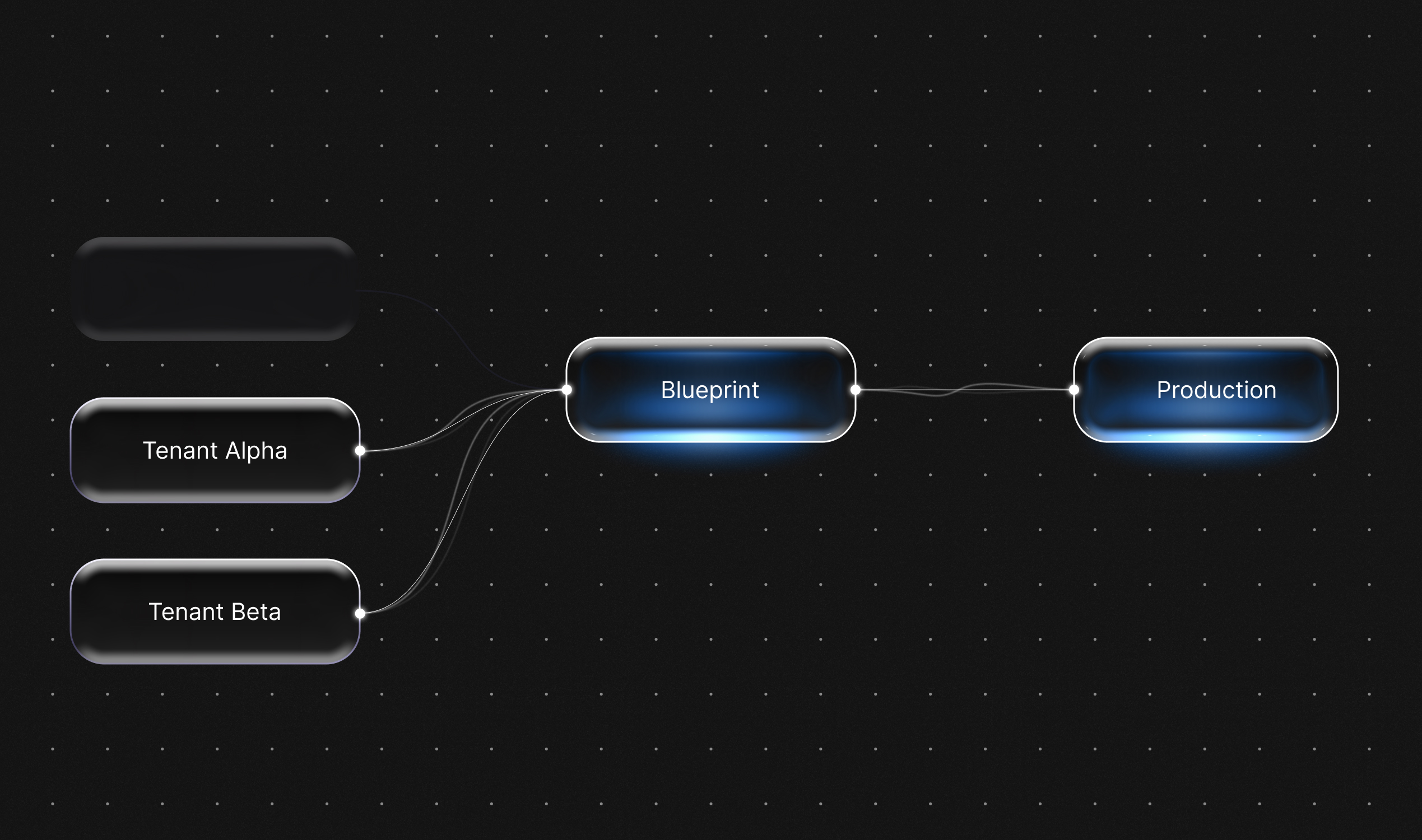
That pain is exactly why we built the Bluebricks Cloud Import Agent. Instead of generating skeleton configs that you manually clean up, the agent treats codification as a multi-stage workflow:
- Codification. The agent generates infrastructure code from your selected resources. Not template-based generation. AI-driven code that understands resource relationships and dependencies.
- Check and iterate. Here's where it diverges from every tool above. The agent runs the generated code through terraform plan, analyzes the output, and iterates. It adjusts the config until the plan shows no changes. No manual edit-plan-fix cycles.
- Publishing. The config becomes a Blueprint - a reusable, modular package that integrates into a managed Bluebricks environment with governance, orchestration, and lifecycle management.
How this closes the MAGIC Gap:
- Modularization. Output is structured as reusable Blueprints, not monolithic .tf dumps.
- Awareness. Related resources are grouped together with their dependencies preserved. Import a VPC and the agent understands the subnets, route tables, and NAT gateways that belong with it.
- Governance. Imported resources become part of a managed environment with the governance layer that Bluebricks provides.
- Iteration. The check-and-iterate loop is built in. The agent keeps refining until plan is clean.
- Continuity. Imported resources aren't orphaned. They're immediately part of an environment you can manage, promote, and govern going forward.
You can pull the generated Terraform code locally for review:
This lets you inspect the code, push it to Git, and integrate it into your existing workflows. The agent handles the heavy lifting. You keep full control of the output.
For a single resource or a small batch, the native tools work fine. But if you're staring at hundreds of unmanaged resources and you need production-ready modular code - not a starting point for weeks of cleanup - this is what we built Bluebricks to solve.
Key Takeaways
Regardless of the tool, the takeaway is simple:
- Start with discovery. Before you codify anything, know what you have. Use Terraformer or provider-specific tools to get a resource inventory. You can't plan an import if you don't know the scope.
- The tools work, but they're bootstrap-only. terraform import, Terraformer, and aztfexport will get resources into state. They won't give you production-quality modular governed code. Budget real time for cleanup if you go the manual route.
- Close the MAGIC Gap, one way or another. Whether you invest the engineering effort to modularize, add governance, and build iteration loops yourself - or use an agent-based approach like Bluebricks Cloud Import - don't stop at raw import. Skeleton code with no structure is only marginally better than no code at all.
The worst option is leaving infrastructure unmanaged. Every day those resources stay outside your IaC, drift builds up, risk compounds, and the eventual migration gets harder.
If you're ready to close the gap faster, give the Cloud Import Agent a try. It would have saved me weeks during that migration. That experience is a big part of why we built it.