# Roles and Permissions

## Overview

Bluebricks uses role-based access control (RBAC) to govern who can do what across your organization. Every user is assigned one account-level role that determines their permissions for all resources: clouds, collections, packages, environments, secrets, webhooks, and more.

{% hint style="info" icon="bookmark" %}
Account-level roles control what a user can do. Collection membership controls where they can do it. See [Owners and Members](/docs/orchestration/collections/owners-and-members.md) for collection-level access.
{% endhint %}

## Roles

Bluebricks defines four roles, ordered from most to least privileged: **Admin**, **Builder**, **Deployer**, and **Viewer**.

Read more about each role:

{% tabs %}
{% tab title="Admin" %}
**Admins have full access** to every resource and action in the organization. Admins manage users, configure organization settings, create API keys, and govern all collections, packages, and environments.

Assign this role to platform team leads and organization owners.
{% endtab %}

{% tab title="Builder" %}
**Builders can create and manage** infrastructure packages (artifacts and blueprints), collections, clouds, secrets, and webhooks. Builders can also initiate and manage deployments. They cannot invite or manage users, change organization settings, or create API keys.

Assign this role to infrastructure engineers who author and maintain IaC.
{% endtab %}

{% tab title="Deployer" %}
**Deployers can initiate runs and approve or apply plans.** Deployers have read access to the resources they need for deployment (collections, packages, clouds) but cannot create or modify infrastructure definitions. Deployers see only the **Deploy** and **Plan** pages.

Assign this role to operations engineers or CI/CD service accounts that run deployments without authoring IaC.
{% endtab %}

{% tab title="Viewer" %}
**Viewers have read-only access** to all resources. Viewers can browse collections, packages, environments, clouds, and organization data but cannot create, modify, or delete anything.

Assign this role to stakeholders, auditors, or team members who need visibility without write access.
{% endtab %}
{% endtabs %}

{% hint style="info" %}
When you invite a user, the role selector defaults to **Viewer**. If a user logs in without having been invited or assigned a role (for example, via SSO), they are automatically assigned the **Deployer** role.
{% endhint %}

## How to invite users

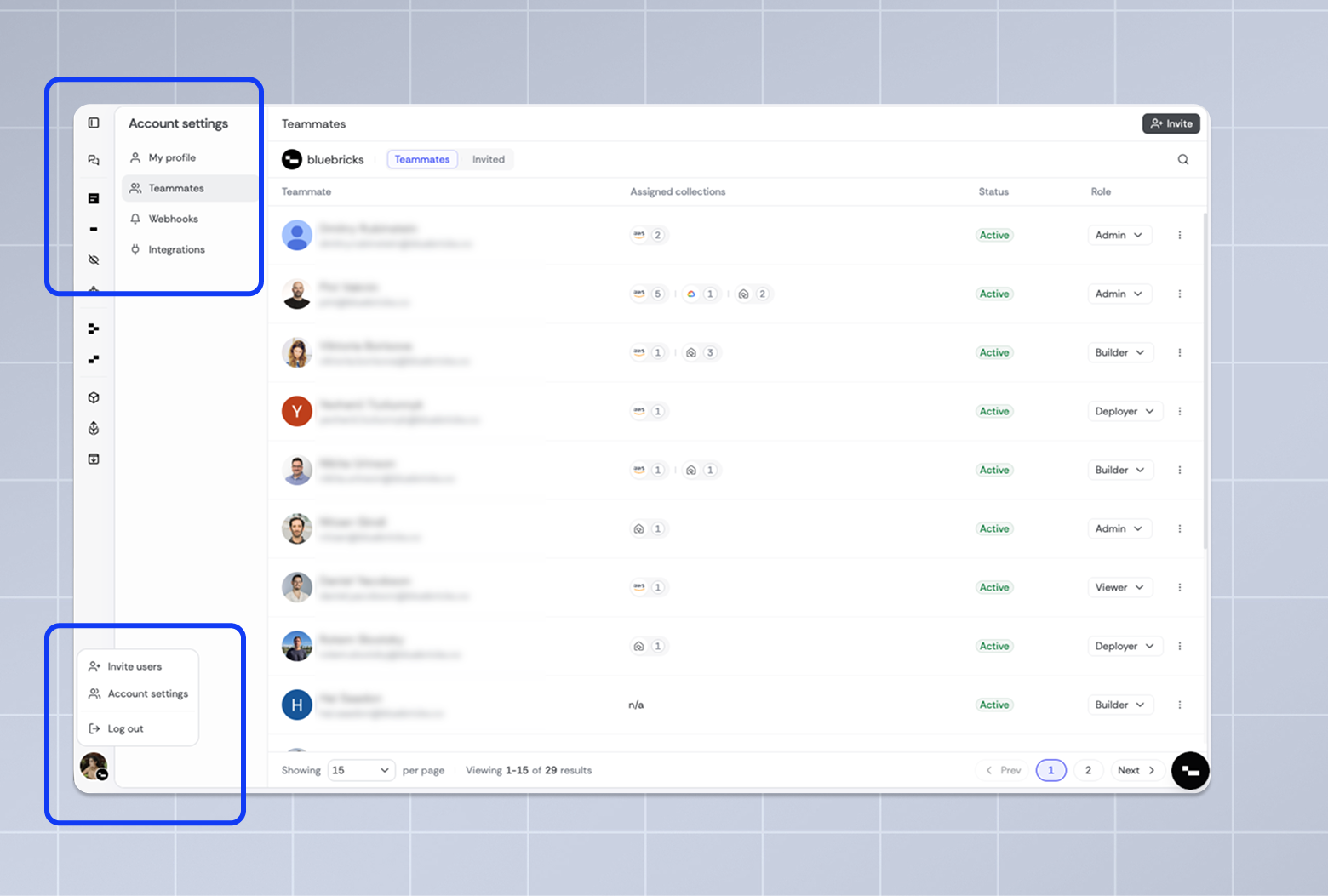
You can invite users from three places:

* **Sidebar menu** > **Invite users** (quickest path)
* **Account Settings** > **Teammates** > **Invite** (top-right)
* **Collection page** > **Assigned users** > **Invite teammates** (pre-selects the collection)

<figure><picture><source srcset="/files/B93wofGoL5nHUhT5wKvs" media="(prefers-color-scheme: dark)"><img src="/files/o777YwbhLwk64Vy5NsVm" alt="Account Settings Teammates tab and sidebar menu showing the Invite users entry points"></picture><figcaption></figcaption></figure>

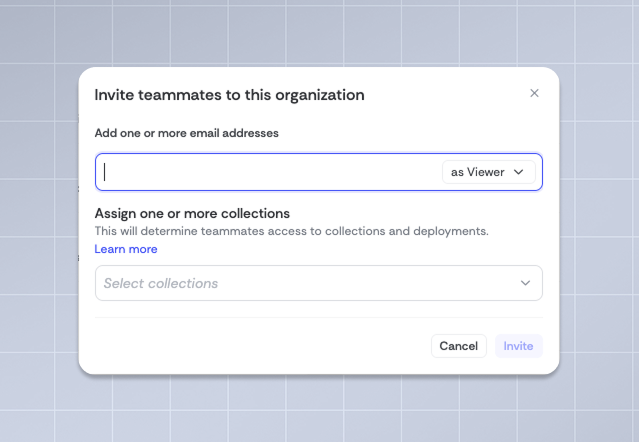
All three open the same invite modal. The steps are:

{% stepper %}
{% step %}

#### Enter email addresses

Add one or more email addresses. You can paste a comma-separated list to invite multiple people at once.

<figure><picture><source srcset="/files/z0f4oNwC1yZoZhrGA8vI" media="(prefers-color-scheme: dark)"><img src="/files/QkTayLJvOkdVMIqJqlGA" alt="Invite teammates modal showing email input, role selector, and collection picker"></picture><figcaption></figcaption></figure>
{% endstep %}

{% step %}

#### Select an organization role

Choose a role from the dropdown. This sets what the invited user can do across the organization. See [Roles](#roles) above for what each role allows.
{% endstep %}

{% step %}

#### Assign collections (optional)

Select one or more collections to grant the user access on acceptance. Each user is added as a **Member** by default. There is no option to assign the Owner role at invite time; you can change their collection role to **Owner** after they accept.

When you invite from a collection page, that collection is pre-selected and the collections picker is locked. To assign additional collections, use the invite flow from **Account Settings** instead.
{% endstep %}

{% step %}

#### Send the invite

Click **Invite**. The invited users appear in the **Invited** tab in Account Settings until they accept.
{% endstep %}
{% endstepper %}

{% hint style="info" icon="user-key" %}
Only admins can invite users, change roles, and manage user status.
{% endhint %}

## Managing users

Users are managed in **Account Settings** > [**Teammates**](https://app.bluebricks.co/settings?tab=members). The page has two tabs:

* **Teammates**: active members of your organization, showing their assigned collections, status, and role
* **Invited**: pending and canceled invitations

### User statuses

| Status          | Description                                            | Available actions       |
| --------------- | ------------------------------------------------------ | ----------------------- |
| Active          | User has accepted the invite and is using the platform | Change role, Deactivate |
| Invited         | Invitation sent but not yet accepted                   | Cancel invite           |
| Invite canceled | Invitation was canceled before acceptance              | Remove                  |
| Inactive        | User was deactivated by an admin                       | Remove                  |

### Change a user's role

Find the user in the **Teammates** tab and use the **Role** dropdown to select a new role. The change takes effect immediately.

### Deactivate a user

Find the user in the **Teammates** tab, click the **three-dot menu**, and select **Deactivate**. Deactivated users lose access but their data is preserved. They appear with an **Inactive** status.

### Remove a user

Deactivated users and canceled invitations can be permanently removed. Find the user in the appropriate tab, click the **three-dot menu**, and select **Remove**.

## What each role can do

The tables below show every permission and which roles include it.

#### Cloud accounts

<table><thead><tr><th width="201.921875">Permission</th><th width="98.4296875">Admin</th><th width="95.765625">Builder</th><th width="109">Deployer</th><th width="99.71484375">Viewer</th></tr></thead><tbody><tr><td>Create cloud accounts</td><td>Yes</td><td>Yes</td><td></td><td></td></tr><tr><td>View cloud accounts</td><td>Yes</td><td>Yes</td><td>Yes</td><td>Yes</td></tr><tr><td>Update cloud accounts</td><td>Yes</td><td>Yes</td><td></td><td></td></tr><tr><td>Delete cloud accounts</td><td>Yes</td><td>Yes</td><td></td><td></td></tr></tbody></table>

#### Collections

<table><thead><tr><th width="202.2890625">Permission</th><th width="102.36328125">Admin</th><th width="104.8515625">Builder</th><th width="108.4375">Deployer</th><th width="102.19140625">Viewer</th></tr></thead><tbody><tr><td>Create collections</td><td>Yes</td><td>Yes</td><td></td><td></td></tr><tr><td>View collections</td><td>Yes</td><td>Yes</td><td>Yes</td><td>Yes</td></tr><tr><td>Update collections</td><td>Yes</td><td>Yes</td><td></td><td></td></tr><tr><td>Delete collections</td><td>Yes</td><td>Yes</td><td></td><td></td></tr></tbody></table>

#### Packages (artifacts and blueprints)

<table><thead><tr><th width="209.44140625">Permission</th><th width="93.48046875">Admin</th><th width="95.4375">Builder</th><th width="107.83203125">Deployer</th><th width="95.79296875">Viewer</th></tr></thead><tbody><tr><td>Create packages</td><td>Yes</td><td>Yes</td><td></td><td></td></tr><tr><td>View packages</td><td>Yes</td><td>Yes</td><td>Yes</td><td>Yes</td></tr><tr><td>Update packages</td><td>Yes</td><td>Yes</td><td></td><td></td></tr><tr><td>Delete packages</td><td>Yes</td><td>Yes</td><td></td><td></td></tr></tbody></table>

#### Environments and runs

<table><thead><tr><th width="220.79296875">Permission</th><th width="104.40234375">Admin</th><th width="98.32421875">Builder</th><th width="108.10546875">Deployer</th><th width="97.64453125">Viewer</th></tr></thead><tbody><tr><td>Create environments</td><td>Yes</td><td>Yes</td><td>Yes</td><td></td></tr><tr><td>View environments</td><td>Yes</td><td>Yes</td><td>Yes</td><td>Yes</td></tr><tr><td>View run plans</td><td>Yes</td><td>Yes</td><td>Yes</td><td>Yes</td></tr><tr><td>Approve runs</td><td>Yes</td><td>Yes</td><td>Yes</td><td></td></tr></tbody></table>

{% hint style="info" %}
Approving runs from [Slack](/docs/integrations/slack.md) is limited to admins and builders. Deployers can approve runs through the web UI if they are an owner of the collection.
{% endhint %}

#### Secrets

<table><thead><tr><th width="218.02734375">Permission</th><th width="96.03515625">Admin</th><th width="100.640625">Builder</th><th width="109.05859375">Deployer</th><th width="98.4921875">Viewer</th></tr></thead><tbody><tr><td>Create secrets</td><td>Yes</td><td>Yes</td><td></td><td></td></tr><tr><td>View secrets</td><td>Yes</td><td>Yes</td><td>Yes</td><td>Yes</td></tr><tr><td>Update secrets</td><td>Yes</td><td>Yes</td><td></td><td></td></tr><tr><td>Delete secrets</td><td>Yes</td><td>Yes</td><td></td><td></td></tr></tbody></table>

#### Webhooks

<table><thead><tr><th width="221.91015625">Permission</th><th width="93.546875">Admin</th><th width="97.55078125">Builder</th><th width="107.12109375">Deployer</th><th width="99.046875">Viewer</th></tr></thead><tbody><tr><td>Create webhooks</td><td>Yes</td><td>Yes</td><td></td><td></td></tr><tr><td>View webhooks</td><td>Yes</td><td>Yes</td><td>Yes</td><td>Yes</td></tr><tr><td>Update webhooks</td><td>Yes</td><td>Yes</td><td></td><td></td></tr><tr><td>Delete webhooks</td><td>Yes</td><td>Yes</td><td></td><td></td></tr></tbody></table>

#### Users

<table><thead><tr><th width="225.94921875">Permission</th><th width="99.88671875">Admin</th><th width="97.72265625">Builder</th><th width="109.77734375">Deployer</th><th width="96.72265625">Viewer</th></tr></thead><tbody><tr><td>Invite users</td><td>Yes</td><td></td><td></td><td></td></tr><tr><td>View users</td><td>Yes</td><td>Yes</td><td>Yes</td><td>Yes</td></tr><tr><td>Update user roles</td><td>Yes</td><td></td><td></td><td></td></tr><tr><td>Remove users</td><td>Yes</td><td></td><td></td><td></td></tr></tbody></table>

#### Organization and API keys

<table><thead><tr><th width="211.3046875">Permission</th><th width="101.65234375">Admin</th><th width="95.61328125">Builder</th><th width="111.828125">Deployer</th><th width="100.33203125">Viewer</th></tr></thead><tbody><tr><td>View organization</td><td>Yes</td><td>Yes</td><td>Yes</td><td>Yes</td></tr><tr><td>Update organization settings</td><td>Yes</td><td></td><td></td><td></td></tr><tr><td>Create API keys</td><td>Yes</td><td></td><td></td><td></td></tr><tr><td>View API keys</td><td>Yes</td><td></td><td></td><td></td></tr><tr><td>Update API keys</td><td>Yes</td><td></td><td></td><td></td></tr></tbody></table>

{% hint style="info" %}
Long-lived API tokens have a **fixed set of permissions** that do not correspond to any user role. They cannot perform Admin-only actions such as inviting users or changing organization settings. See [API Authentication](https://bluebricks.co/docs/api/authenticate/authentication) for details.
{% endhint %}

#### Other resources

<table><thead><tr><th width="210.90625">Permission</th><th width="93.56640625">Admin</th><th width="97.21484375">Builder</th><th width="110.85546875">Deployer</th><th width="99.66015625">Viewer</th></tr></thead><tbody><tr><td>View tasks</td><td>Yes</td><td>Yes</td><td>Yes</td><td>Yes</td></tr><tr><td>View rescue operations</td><td>Yes</td><td>Yes</td><td>Yes</td><td>Yes</td></tr><tr><td>View vendors</td><td>Yes</td><td>Yes</td><td>Yes</td><td>Yes</td></tr></tbody></table>

### Recommended role mapping for common teams

<table><thead><tr><th width="366.203125">Team function</th><th width="324.50390625">Recommended role</th></tr></thead><tbody><tr><td>Platform / DevOps lead</td><td>Admin</td></tr><tr><td>Infrastructure engineer</td><td>Builder</td></tr><tr><td>Application developer (deploys only)</td><td>Deployer</td></tr><tr><td>CI/CD service account</td><td>Deployer</td></tr><tr><td>Engineering manager / stakeholder</td><td>Viewer</td></tr></tbody></table>

## Account roles vs. collection membership

Bluebricks separates **what** a user can do (account-level role) from **where** they can do it ([collection membership](/docs/orchestration/collections/owners-and-members.md)).

* **Account-level role**: Assigned in **Account Settings > Users**. Defines the user's permissions across the entire organization. A user has exactly one account role.
* **Collection membership**: Assigned in **Collection Settings > Members**. Determines which collections a user can access and whether they are an owner or member of that collection.

Both layers must align for a user to act on a resource. Non-admin users must be assigned to a collection before they can act on its resources; without collection membership, requests will be rejected regardless of the user's account role. For example, a user with the Builder role can create packages, but they can only deploy to collections where they are an assigned member.

{% hint style="info" icon="user-key" %}
Admins can manage any collection, even if they are not listed as a member or owner of that collection.
{% endhint %}

### How the layers work together

<table><thead><tr><th width="193.90234375">Scenario</th><th width="130.0546875">Account role</th><th width="128.92578125">Collection membership</th><th width="292.64453125">Result</th></tr></thead><tbody><tr><td>Platform lead needs full control</td><td>Admin</td><td>Owner</td><td>Full access to the organization</td></tr><tr><td>Engineer authors IaC for a team</td><td>Builder</td><td>Member</td><td>Can create and publish packages; can deploy to member collections</td></tr><tr><td>CI/CD pipeline deploys to production</td><td>Deployer</td><td>Member</td><td>Can run deployments in member collections; cannot modify packages or settings</td></tr><tr><td>Manager reviews infrastructure state</td><td>Viewer</td><td>Member</td><td>Can view all resources in member collections; cannot make changes</td></tr></tbody></table>

## What's next?

<table data-view="cards"><thead><tr><th></th><th data-hidden data-card-cover data-type="image">Cover image</th><th data-hidden data-card-target data-type="content-ref"></th></tr></thead><tbody><tr><td>Set collection-level access in <strong>Owners and Members</strong></td><td><a href="/files/uFdGSgeUhiskZxj2uPFK">/files/uFdGSgeUhiskZxj2uPFK</a></td><td><a href="/pages/3Uu2sNFNMlBLNB5XuEiw">/pages/3Uu2sNFNMlBLNB5XuEiw</a></td></tr><tr><td>Create governance rules for collections with <strong>policies</strong></td><td><a href="/files/4h9Qftdzrc8tnJzvmX7I">/files/4h9Qftdzrc8tnJzvmX7I</a></td><td><a href="/pages/JCmPkQRxdAeqDtUKS00A">/pages/JCmPkQRxdAeqDtUKS00A</a></td></tr><tr><td>Set up <strong>Single-Sign-On</strong></td><td><a href="/files/3gwL63m9ZfSJSeSyiwop">/files/3gwL63m9ZfSJSeSyiwop</a></td><td><a href="/pages/xrqBgD3qEhNEHaPrW141">/pages/xrqBgD3qEhNEHaPrW141</a></td></tr><tr><td>Set the <strong>CLI authentication</strong></td><td><a href="/files/QNS26wrpvvMA7pTdW5Sc">/files/QNS26wrpvvMA7pTdW5Sc</a></td><td><a href="/pages/P6ISR6P7N7SAHSyila5a">/pages/P6ISR6P7N7SAHSyila5a</a></td></tr><tr><td>Learn about <strong>API token management</strong></td><td><a href="/files/MdKoWlA6AAaCoW5J77Im">/files/MdKoWlA6AAaCoW5J77Im</a></td><td><a href="https://bluebricks.co/docs/api/authenticate/authentication">https://bluebricks.co/docs/api/authenticate/authentication</a></td></tr></tbody></table>


---

# Agent Instructions: Querying This Documentation

If you need additional information that is not directly available in this page, you can query the documentation dynamically by asking a question.

Perform an HTTP GET request on the current page URL with the `ask` query parameter:

```
GET https://bluebricks.co/docs/organization-and-security/roles-and-permissions.md?ask=<question>
```

The question should be specific, self-contained, and written in natural language.
The response will contain a direct answer to the question and relevant excerpts and sources from the documentation.

Use this mechanism when the answer is not explicitly present in the current page, you need clarification or additional context, or you want to retrieve related documentation sections.