# Using Context References

### Overview

You can insert **dynamic references** into property values when configuring **collection properties** or **environment properties**.

These references automatically pull information from the current **Environment** or **Collection**, so you don’t have to hard-code values.

When the environment runs, the reference will be replaced with the actual value.

### Available References

#### Environment References

<table data-full-width="false"><thead><tr><th width="294.9453125">Reference</th><th width="272.078125" valign="middle">Description</th><th>Example Output</th></tr></thead><tbody><tr><td><code>${{bricks.environment.slug}}</code></td><td valign="middle">The unique slug of the environment.</td><td>payments-prod</td></tr><tr><td><code>${{bricks.environment.package}}</code></td><td valign="middle">The blueprint or package assigned to the environment.</td><td>@bluebricks/payments_blueprint</td></tr><tr><td><code>${{bricks.environment.created_time}}</code></td><td valign="middle">The date/time the environment was created. <em>(Only works for existing</em> environment<em>s)</em></td><td>2025-06-30T09:27:14Z</td></tr></tbody></table>

{% hint style="danger" %}
`${{bricks.environment.created_time}}` refers to the creation time of the parent environment and not to a specific run. This means every run of the same environment will have the same creation\_time.
{% endhint %}

#### Collection References

<table><thead><tr><th width="295.03515625">Reference</th><th width="271.515625">Description</th><th>Example Output</th></tr></thead><tbody><tr><td><code>${{bricks.collection.slug}}</code></td><td>The unique slug of the collection.</td><td>prod</td></tr><tr><td><code>${{bricks.collection.name}}</code></td><td>The display name of the collection.</td><td>Production</td></tr></tbody></table>

### How It Works <a href="#dedcf9e6-cb47-4829-97a2-8a8e67306395" id="dedcf9e6-cb47-4829-97a2-8a8e67306395"></a>

Anywhere you can type a property value, you can use:

```
${{bricks.environment.*}} → Information about the environment

${{bricks.collection.*}} → Information about the collection
```

When the environment starts, these placeholders are replaced with the real values from your Bluebricks setup.

### **Example Usage** <a href="#id-418fc142-6d1f-4d7b-a901-dfd76f6b4f63" id="id-418fc142-6d1f-4d7b-a901-dfd76f6b4f63"></a>

#### Collection **Properties Page** <a href="#id-2bdf778c-0a1a-4038-a1be-19cf46933f90" id="id-2bdf778c-0a1a-4038-a1be-19cf46933f90"></a>

You can set a property to dynamically reference the collection name:

```
app_collection = ${{bricks.collection.name}}
```

<figure><img src="/files/OLHYEtNexjXy0l1tMlCe" alt=""><figcaption></figcaption></figure>

When deployed to **Production** collection, this becomes:

```
app_collection = Production
```

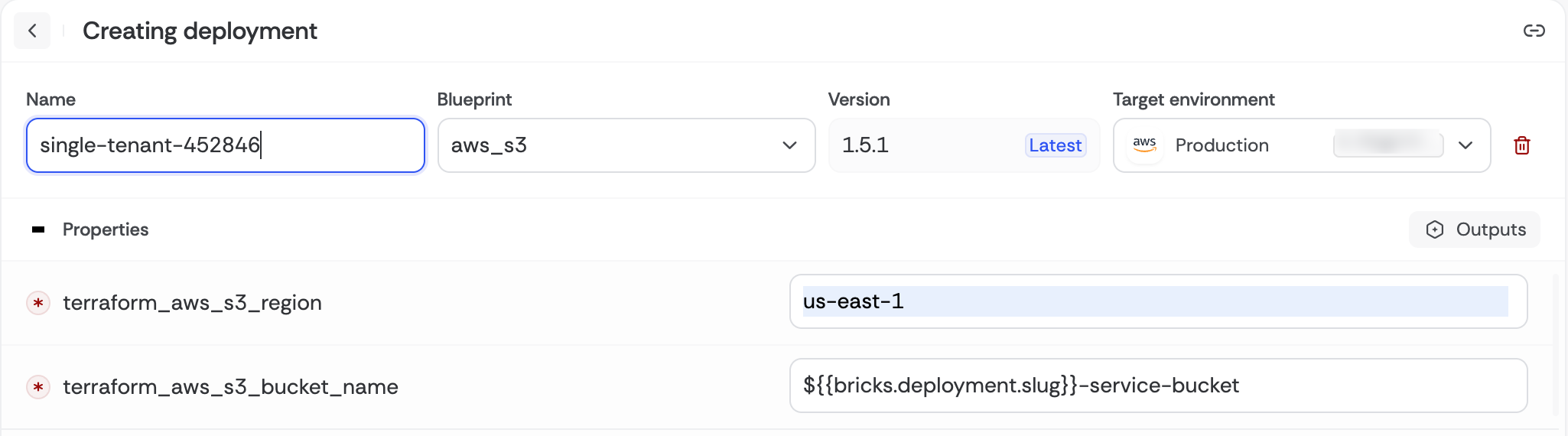
#### Environment **Page** <a href="#id-2bdf778c-0a1a-4038-a1be-19cf46933f90" id="id-2bdf778c-0a1a-4038-a1be-19cf46933f90"></a>

You can set a property to dynamically reference the environment name:

```
bucket_name = ${{bricks.environment.slug}}
```

<figure><img src="/files/cg1Ia9ToTRyL9hjSluUf" alt=""><figcaption></figcaption></figure>

When deployed the property will be resolved as:

```
bucket_name = single-tenant-452846-service-bucket
```


---

# Agent Instructions: Querying This Documentation

If you need additional information that is not directly available in this page, you can query the documentation dynamically by asking a question.

Perform an HTTP GET request on the current page URL with the `ask` query parameter:

```
GET https://bluebricks.co/docs/orchestration/runs/using-context-references.md?ask=<question>
```

The question should be specific, self-contained, and written in natural language.
The response will contain a direct answer to the question and relevant excerpts and sources from the documentation.

Use this mechanism when the answer is not explicitly present in the current page, you need clarification or additional context, or you want to retrieve related documentation sections.