> For the complete documentation index, see [llms.txt](https://bluebricks.co/docs/llms.txt). Markdown versions of documentation pages are available by appending `.md` to page URLs; this page is available as [Markdown](https://bluebricks.co/docs/orchestration/environments/environment-ttl.md).
# Time to Live (TTL)
Define how long an environment should be up and running
## Overview
Environment TTL (Time to Live) lets you schedule the automatic uninstallation of an environment. Instead of relying on someone to manually tear down infrastructure, you define a recurring daily or weekly schedule and Bluebricks uninstalls the environment at the specified time.
## How environment TTL works
TTL supports intentional environment management. You can shut down dev, staging, or sandbox environments outside business hours to control cloud spend, align teardown with maintenance windows, or ensure environments follow internal operational standards. It also helps prevent environments from running longer than intended, reducing drift and maintaining cleaner collections.
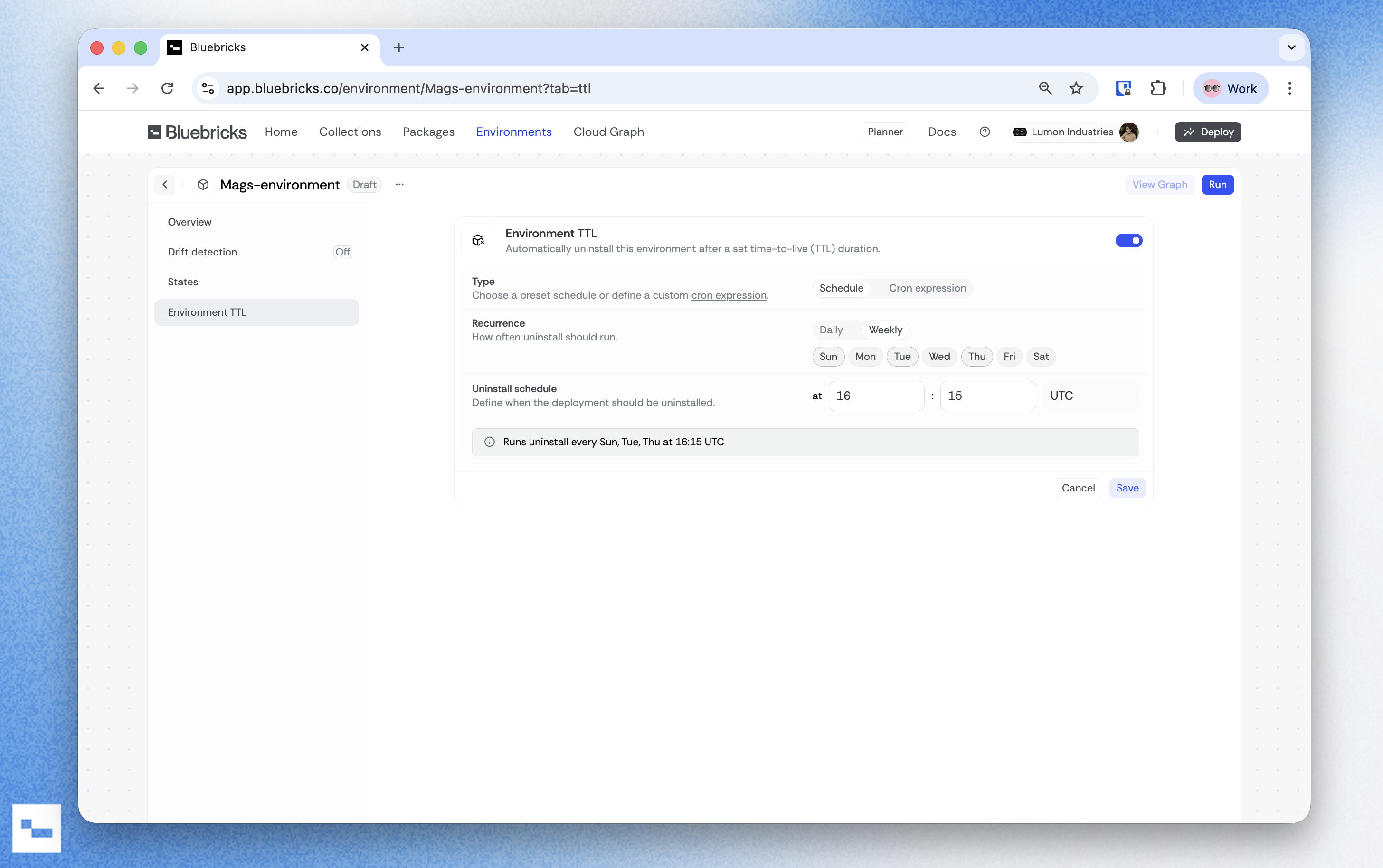
Each environment includes a dedicated **Environment TTL** tab on its detail page. From this tab, you can create, edit, enable, or disable a TTL schedule.
When a TTL schedule triggers, Bluebricks starts an uninstall run for the environment, the same operation as a manual uninstall. The run follows the standard environment lifecycle: it evaluates the blueprint, builds a destroy plan across all packages, and tears down resources in the correct dependency order. The run appears in the environment's history with full logs and status tracking.
The uninstall follows the same policies and approval flows configured on the target collection. If an approval policy is in place, the scheduled uninstall respects it.
{% hint style="info" %}
A TTL schedule does not delete the environment itself. It uninstalls the deployed resources. The environment record, history, and configuration remain intact. You can re-run the environment at any time.
{% endhint %}
## How to set up a TTL schedule
{% stepper %}
{% step %}
**Turn on TTL**
1. Go to the [Environment](https://app.bluebricks.co/environments) page and click **Review** on the environment you want to configure
2. Click the **Environment TTL** tab
3. Set the toggle to **On**, which will open the scheduler
{% endstep %}
{% step %}
**Create a schedule**
1. Choose a recurrence type: **Daily** or **Weekly**
1. Set the time in hours and minutes using 24-hour UTC time
2. For weekly schedules, select which days the uninstall should run
2. Click **save**
Using CRON expression
You can also use a five-field cron structure in UTC to schedule the TTL.
Configure the minute, hour, and day-of-week fields, which accept values 0-6 (Sun-Sat). The day-of-month and month fields are fixed to `*`.
{% endstep %}
{% endstepper %}
{% hint style="info" %}
TTL schedules run under a dedicated system identity. The uninstall run is attributed to the scheduler, not to a specific user.
{% endhint %}
{% hint style="success" %}
TTL works well with temporary scaling workflows. Set a TTL on environments that are scaled up for testing to ensure automatic cleanup. See [Temporary Scaling](/docs/managing-infrastructure/managing-infrastructure/temporary-scaling.md) for the full workflow.
{% endhint %}
#### Edit or disable TTL
You can edit or disable Environment TTL at any time to change the recurrence, adjust the time, or disable the schedule. Disabling preserves your configuration so you can re-enable it later without reconfiguring.